
Course 2
Course 2: The AI Coach
Compator
Executive Summary
The purpose of this document is to teach a learner who has finished "Building an AI Draughts Game for the Web" how to add a coach that answers players' questions in plain English. The coach is a language model, running on the learner's own server through Ollama, that may only state facts it has obtained by calling the game engine as a tool. The scope covers the idea of tool calling, running a model with Ollama, turning the engine into tools, the tool-calling loop in Flask, the coach panel in the browser, an automatic evaluation of the coach's accuracy, tests and deployment. Hosted language model services, user accounts and streaming answers are out of scope.
All code in this course was built and tested before the course was written, using the Course 1 application as its starting point. The language model itself could not be downloaded in the environment used to write the course, so the coach was tested against a stand-in that copies Ollama's documented chat interface but follows fixed rules. Every part of the coach that does not depend on the model's judgement was therefore tested directly, and the course explains how each learner measures their own model with the same evaluation. The matters assessed are whether the coach always consults the engine, whether its answers can be checked automatically, and what a model needs from the server. Sources are listed in the appendix.
Module 0: Before You Start
What you will build
In Course 1 you built a draughts game with a computer opponent that searches ahead with minimax. In this course you add a coach: a panel beside the board where a player can ask "Why did the computer play that?", "What should I play?" or "What happens if I play c3-d4?", and get a short answer in plain English.
The answers are written by a language model, the same kind of AI that powers chatbots. The important part of the course is how we stop it making things up. The model is never allowed to know anything about the game by itself. Whenever it needs a fact, it must ask the real game engine, and every answer is checked against what the engine said before the player sees it.
What you need
The finished Course 1 project, working on your computer and on your server
Ollama, free software for running language models, installed in Module 2
Node.js on your computer, as in Course 1, and on your server, installed in Module 8
A server with more memory than Course 1 needed. How much depends on the model you choose, and Module 8 shows you how to measure it
Start by making a copy of your Course 1 folder called draughts-coach, and open the copy in VS Code. Every change in this course is made to the copy, so your Course 1 game keeps working.
Your copy includes the venv folder, but a virtual environment cannot be copied: the copy still points at the folder where it was first made, so anything you install would go there instead. In the copy, delete the venv folder, then create and activate a new one exactly as in Course 1, and install the packages with pip install -r requirements.txt.
Teacher's note: On a Mac, AirPlay Receiver uses port 5000, the port the game uses when you run python app.py on your computer. If Flask says the port is already in use, or the browser shows an error instead of the game, turn AirPlay Receiver off (on macOS 13 or later in System Settings, General, AirDrop and Handoff; on macOS 12 in System Preferences, Sharing), or change port=5000 to port=5001 in the last line of app.py and open http://127.0.0.1:5001 instead.
Teacher's note: This course was written in an environment that could not download a language model. Every part of the coach was tested against a stand-in that behaves like Ollama but follows fixed rules, and Module 6 shows you how to measure your real model in exactly the same way. Where the course says something about how a real model behaves, it says so as a caution rather than a measured fact.
Module 1: What Language Models Do Well and Badly
Good with words, unreliable with facts
A language model is trained on a very large amount of text to predict which words are likely to come next. That makes it very good at writing clear, friendly sentences and at understanding questions that are phrased in many different ways. It does not make it good at working out the best move in a draughts position. A model that has never been shown the position will produce a confident, fluent answer that may be completely wrong. People call this hallucination.
Course 1 already explained why we did not let a language model choose the computer's moves. This course uses a language model for the job it is good at, and gives the job it is bad at to the engine.
Tool calling
Modern language models can be given a list of tools: functions in your program, each with a name and a description. When the model needs something it cannot know, it does not answer yet. Instead, it replies with a request such as "please call what_if with move c3-d4". Your program runs the function, sends the result back, and the model then writes its answer using that result. This is called tool calling, and it is the pattern behind most business AI assistants.
Our coach has three tools, all answered by the engine you built in Course 1.
| Tool | What it answers |
|---|---|
| analyse_position | Whose turn it is, whether a capture is compulsory, every legal move, and the three best moves with an assessment |
| what_if | Whether a move is legal, the opponent's best reply, how the position looks afterwards, and how the move ranks against the others |
| review_last_move | How the move just played ranks against the other moves that were possible at the time |
Grounding and checking
Giving a model verified facts to work from is called grounding. Grounding makes mistakes much less likely, but it does not make them impossible: a model can still copy a fact wrongly or add one of its own. So the coach has a second line of defence. After the model answers, the server finds every move mentioned in the answer and checks that the engine actually reported it. If not, the player sees a warning instead of a confident mistake.
How the pieces fit together
Figure 1 shows where everything runs. Compare it with Figure 1 in Course 1: the browser side gains one small file, and the server gains three things. These are the coach code in Flask, Node.js to run the engine on the server, and Ollama to run the model.
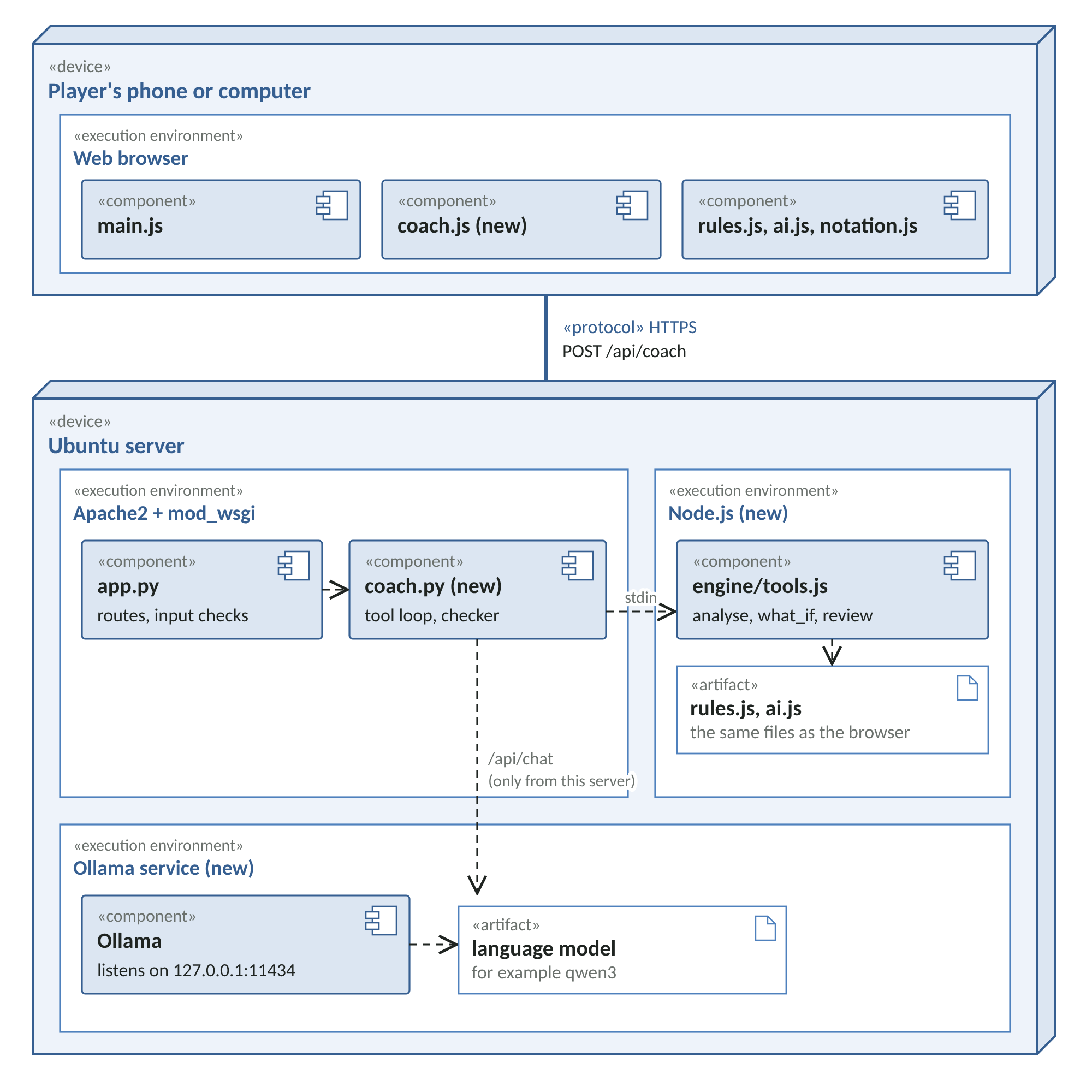
Figure 1: UML deployment diagram of the game with the coach added. New parts are marked "(new)".
Notice two design decisions. First, the server runs exactly the same rules.js and ai.js files as the browser, through Node.js, so the coach and the game can never disagree about the rules. Second, Ollama only listens on the server itself. Players never talk to the model directly: every question goes through app.py, which checks it first.
Check your progress
You should be able to explain, in your own words, why the coach calls a tool before answering, and what the server does after the model answers.
Module 2: Running a Model with Ollama
Installing Ollama
Ollama is free, open-source software that downloads language models and runs them on your own computer, with a simple web interface that other programs can call. Install it on your own computer first, so you can develop and test the coach before touching the server.
Go to https://ollama.com and download Ollama for your computer
Install it with the default options
Open a terminal and type
ollama --versionto check it is installed
Choosing and downloading a model
Ollama can run many different models. For the coach you need one that is small enough for your computer and server, and that supports tool calling. Not every model does. Check the model's page in Ollama's library before you choose, and read its licence: open-weight models are free to download, but each comes with its own terms.
The code in this course uses a model called qwen3 by default, because Ollama's own tool-calling documentation uses it in its examples. You can change it to any tool-capable model with one setting. To download it, type the command below.
ollama pull qwen3Teacher's note: Larger models usually follow instructions better but need more memory and answer more slowly. Do not guess which is right for you. Module 6 gives you a way to measure accuracy and speed, so you can compare two models on the same questions and choose with evidence.
Talking to the model directly
Ollama listens for requests on your own computer at http://127.0.0.1:11434. Before writing any code, check that it answers. On macOS or Linux, type the following.
curl http://127.0.0.1:11434/api/chat -d '{"model": "qwen3", "stream": false,
  "messages": [{"role": "user", "content": "Say hello in five words."}]}'
On Windows, the VS Code terminal runs PowerShell, so type the following instead, on one line.
Invoke-RestMethod http://127.0.0.1:11434/api/chat -Method Post -Body '{"model": "qwen3", "stream": false, "messages": [{"role": "user", "content": "Say hello in five words."}]}'You should see a block of JSON with the model's reply inside "message". The first request after starting can take a while, because Ollama has to load the model into memory. Ollama's documentation says models stay loaded for five minutes by default, so a question after a long pause will be slow again.
The stand-in, for development
Language models are slow and their answers vary, which makes them awkward to develop against. The project includes a stand-in, devtools/fake_ollama.py, which answers in exactly the same format as Ollama but instantly, and by fixed rules. It calls one tool chosen from the question, then writes an answer from the tool's result. It can also be told to make mistakes on purpose, which is how we test the checker in Module 6. Module 6 lists it in full.
Check your progress
Ollama is installed, ollama pull has finished, and the curl command returns an answer from the model.
Module 3: Turning the Engine into Tools
Naming moves
A language model reads and writes text, so it needs a way to name squares and moves. This course uses a simple notation borrowed from chess. Columns are labelled a to h from left to right, and rows 1 to 8 from the bottom. A step is written c3-d4, a capture c3xe5, and a double capture c3xe5xg7. Draughts players often number the squares 1 to 32 instead; we use letters and numbers because they are easier for beginners to read on the board.
Create static/js/notation.js. Like rules.js, it works both in the browser and in Node.js.
File: static/js/notation.js
/*
 * notation.js - names for squares and moves that people (and language models)
 * can read.
 *
 * This course uses its own simple notation, borrowed from chess:
 *   columns a to h from left to right, rows 1 to 8 from the bottom.
 * So Black's pieces start on rows 1 to 3 and White's on rows 6 to 8.
 * A simple move is written c3-d4. A capture is written c3xe5, and a
 * double capture c3xe5xg7.
 * (Draughts players often number the squares 1 to 32 instead; we use
 * letters and numbers because they are easier to read on screen.)
 */

const Notation = (function () {
  const FILES = 'abcdefgh';

  // [row, col] in the code -> 'c3'
  function squareName(sq) {
    const [r, c] = sq;
    return FILES[c] + (8 - r);
  }

  // 'c3' -> [row, col], or null if it is not a square
  function parseSquare(text) {
    const m = /^([a-h])([1-8])$/.exec(text);
    if (!m) return null;
    return [8 - Number(m[2]), FILES.indexOf(m[1])];
  }

  // A move object -> 'c3-d4' or 'c3xe5xg7'
  function moveName(move) {
    const sep = move.captures.length > 0 ? 'x' : '-';
    return move.path.map(squareName).join(sep);
  }

  // Find the legal move with this name in a list of legal moves, or null.
  function findMove(moves, text) {
    const wanted = String(text).trim().toLowerCase();
    return moves.find(m => moveName(m) === wanted) || null;
  }

  return { squareName, parseSquare, moveName, findMove };
})();

if (typeof module !== 'undefined') module.exports = Notation;
Scoring every move
In Course 1 the AI only needed to know its best move. The coach needs more: how every move compares. Add the function below to ai.js, just before the return line at the end. It searches each move with a full window, so every score is exact for the depth searched, not just "worse than the best".
From static/js/ai.js
   * Score every legal move for the side to move, best first.
   * Used by the coach's tools (Course 2). Each move is searched with a full
   * window, so its score is exact for the given depth, not just "worse than
   * the best". Scores are from the point of view of the side to move.
   */
  function scoreMoves(state, depth) {
    const player = state.turn;
    const stats = { nodes: 0 };
    const scored = RulesLib.legalMoves(state).map(move => ({
      move,
      score: minimax(RulesLib.applyMove(state, move), depth - 1,
                     -Infinity, Infinity, false, player, stats)
    }));
    scored.sort((a, b) => b.score - a.score);
    return scored;
  }

  return { LEVELS, WIN_SCORE, evaluate, chooseMove, scoreMoves };
The tools file
Create a folder called engine and, inside it, tools.js. This file is the bridge between the language model and the engine. The Flask server runs it with Node.js, sends it one request as JSON on its standard input, and reads one answer as JSON from its standard output.
Look for three details as you read it.
Scores in words. The engine counts in points, where 100 is about one man.
describeScoreturns that into "roughly level", "better" or "clearly worse", plus the advantage in men, because those are the words we want the coach to useFair ranking. Several moves often score exactly the same.
rankOfgives them the same rank, so the coach never calls a move worse when the engine sees no difference. An earlier version of this code ranked equal moves 1, 2, 3 and so on, and the coach then described a perfectly good move as fifth bestIllegal moves. If the model asks about a move that is not legal,
what_ifsays so and lists the legal moves, so the model can correct itself
File: engine/tools.js
/*
 * engine/tools.js - the game engine, packaged as "tools" a language model can call.
 *
 * The language model never decides anything about the game itself. Whenever
 * it needs a fact - the best move, what happens after a move, how good the
 * last move was - it asks one of these tools, and this file asks the same
 * rules.js and ai.js that run in the browser.
 *
 * The Flask server runs this file with Node.js. It reads one JSON request on
 * standard input and writes one JSON answer on standard output:
 *   { "tool": "what_if", "args": {"move": "c3-d4"},
 *     "position": {...}, "previous": {...}, "last_move": "f6-g5" }
 */

const Rules = require('../static/js/rules.js');
const AI = require('../static/js/ai.js');
const Notation = require('../static/js/notation.js');

const DEPTH = 5;          // how far ahead the tools look
const SIDE = { b: 'Black', w: 'White' };

// Turn an engine score into words a person can follow.
// 100 points is roughly one man, so we report the advantage in men.
function describeScore(score) {
  if (score >= AI.WIN_SCORE) return { men: null, verdict: 'forced win found' };
  if (score <= -AI.WIN_SCORE) return { men: null, verdict: 'forced loss found' };
  const men = Math.round(score / 10) / 10;
  let verdict = 'roughly level';
  if (men >= 0.5) verdict = 'better';
  if (men >= 1.5) verdict = 'clearly better';
  if (men <= -0.5) verdict = 'worse';
  if (men <= -1.5) verdict = 'clearly worse';
  return { men, verdict };
}

function material(board) {
  const n = Rules.countPieces(board);
  return { black_men: n.b, black_kings: n.B, white_men: n.w, white_kings: n.W };
}

// Tool 1: what is the position like, and what are the best moves?
function analysePosition(position) {
  const moves = Rules.legalMoves(position);
  if (moves.length === 0) {
    return { side_to_move: SIDE[position.turn], legal_moves: [], game_over: true };
  }
  const scored = AI.scoreMoves(position, DEPTH);
  return {
    side_to_move: SIDE[position.turn],
    must_capture: moves[0].captures.length > 0,
    legal_moves: moves.map(Notation.moveName),
    best_moves: scored.slice(0, 3).map(s => ({
      move: Notation.moveName(s.move),
      ...describeScore(s.score)
    })),
    material: material(position.board),
    search_depth: DEPTH
  };
}

// Tool 2: what would happen after a particular move?
function whatIf(position, moveText) {
  const moves = Rules.legalMoves(position);
  const move = Notation.findMove(moves, moveText);
  if (!move) {
    return { legal: false, move: moveText, legal_moves: moves.map(Notation.moveName),
             note: 'That move is not legal here.' };
  }
  const after = Rules.applyMove(position, move);
  const result = { legal: true, move: Notation.moveName(move),
                   captures: move.captures.length, crowned: becameKing(position, move) };
  const outcome = Rules.result(after);
  if (outcome) {
    result.game_over = outcome.winner === 'draw' ? 'draw' : SIDE[outcome.winner] + ' wins';
    return result;
  }
  const replies = AI.scoreMoves(after, DEPTH);
  // The reply's score is from the opponent's side, so flip it for the mover.
  result.best_reply = Notation.moveName(replies[0].move);
  result.after_best_reply = describeScore(-replies[0].score);
  const all = AI.scoreMoves(position, DEPTH);
  const mine = all.find(s => Notation.moveName(s.move) === result.move);
  result.rank = rankOf(all, mine.score);
  result.out_of = all.length;
  result.engine_best_move = Notation.moveName(all[0].move);
  return result;
}

// Tool 3: how good was the move that has just been played?
function reviewLastMove(previous, lastMove) {
  if (!previous || !lastMove) return { note: 'No move has been played yet.' };
  const all = AI.scoreMoves(previous, DEPTH);
  const index = all.findIndex(s => Notation.moveName(s.move) === lastMove);
  if (index < 0) return { note: 'The last move could not be found in the previous position.' };
  return {
    played_by: SIDE[previous.turn],
    move: lastMove,
    rank: rankOf(all, all[index].score),
    out_of: all.length,
    engine_best_move: Notation.moveName(all[0].move),
    played_move_score: describeScore(all[index].score),
    best_move_score: describeScore(all[0].score),
    was_forced: all.length === 1,
    was_capture: all[index].move.captures.length > 0
  };
}

function becameKing(position, move) {
  const [fr, fc] = move.path[0];
  const [tr, tc] = move.path[move.path.length - 1];
  const after = Rules.applyMove(position, move);
  return !Rules.isKing(position.board[fr][fc]) && Rules.isKing(after.board[tr][tc]);
}

// Rank 1 means no move scores better. Moves with equal scores share a rank,
// so the tool never calls a move worse when the engine sees no difference.
function rankOf(scored, score) {
  return 1 + scored.filter(s => s.score > score).length;
}

// Accept each board row as a list of squares or as a string such as '.w.w.w.w',
// and always give the rules lists, which they can change safely.
function normalise(p) {
  return { board: p.board.map(row => Array.from(row)), turn: p.turn, quietPlies: p.quietPlies || 0 };
}

// Run one tool request. Exported so the tests can call it directly.
function runTool(request) {
  const { tool, args = {}, last_move } = request;
  const position = normalise(request.position);
  const previous = request.previous ? normalise(request.previous) : null;
  switch (tool) {
    case 'analyse_position': return analysePosition(position);
    case 'what_if': return whatIf(position, args.move);
    case 'review_last_move': return reviewLastMove(previous, last_move);
    default: return { error: 'Unknown tool: ' + tool };
  }
}

module.exports = { runTool, describeScore };

// When run from the command line, read the request from standard input.
if (require.main === module) {
  let input = '';
  process.stdin.on('data', chunk => { input += chunk; });
  process.stdin.on('end', () => {
    try {
      process.stdout.write(JSON.stringify(runTool(JSON.parse(input))));
    } catch (e) {
      process.stdout.write(JSON.stringify({ error: String(e.message || e) }));
    }
  });
}
Try it from the terminal
You can ask the engine a question exactly as the server will. This command sends the starting position and asks for an analysis. Type it on one line.
echo '{"tool": "what_if", "args": {"move": "c3-d4"}, "position": {"turn": "b",
  "board": [".w.w.w.w","w.w.w.w.",".w.w.w.w","........","........",
  "b.b.b.b.",".b.b.b.b","b.b.b.b."]}}' | node engine/tools.js
The board here is written as eight strings, one per row, to keep the command short. The normalise function in tools.js turns each string into a list of squares before the rules see it. You should see a JSON answer saying the move is legal, with the opponent's best reply and the move's rank.
Check your progress
The command above prints an answer, and asking about c3-c4 instead reports that the move is not legal.
Module 4: Tool Calling: the Model Asks, the Engine Answers
The conversation
Ollama's chat interface takes a list of messages. Each message has a role: system for standing instructions, user for the question, assistant for the model's replies, and tool for the results we send back. With each request we also send the list of tools, described in a format called JSON Schema, which tells the model each tool's name, purpose and arguments.
Figure 2 follows one question all the way through.
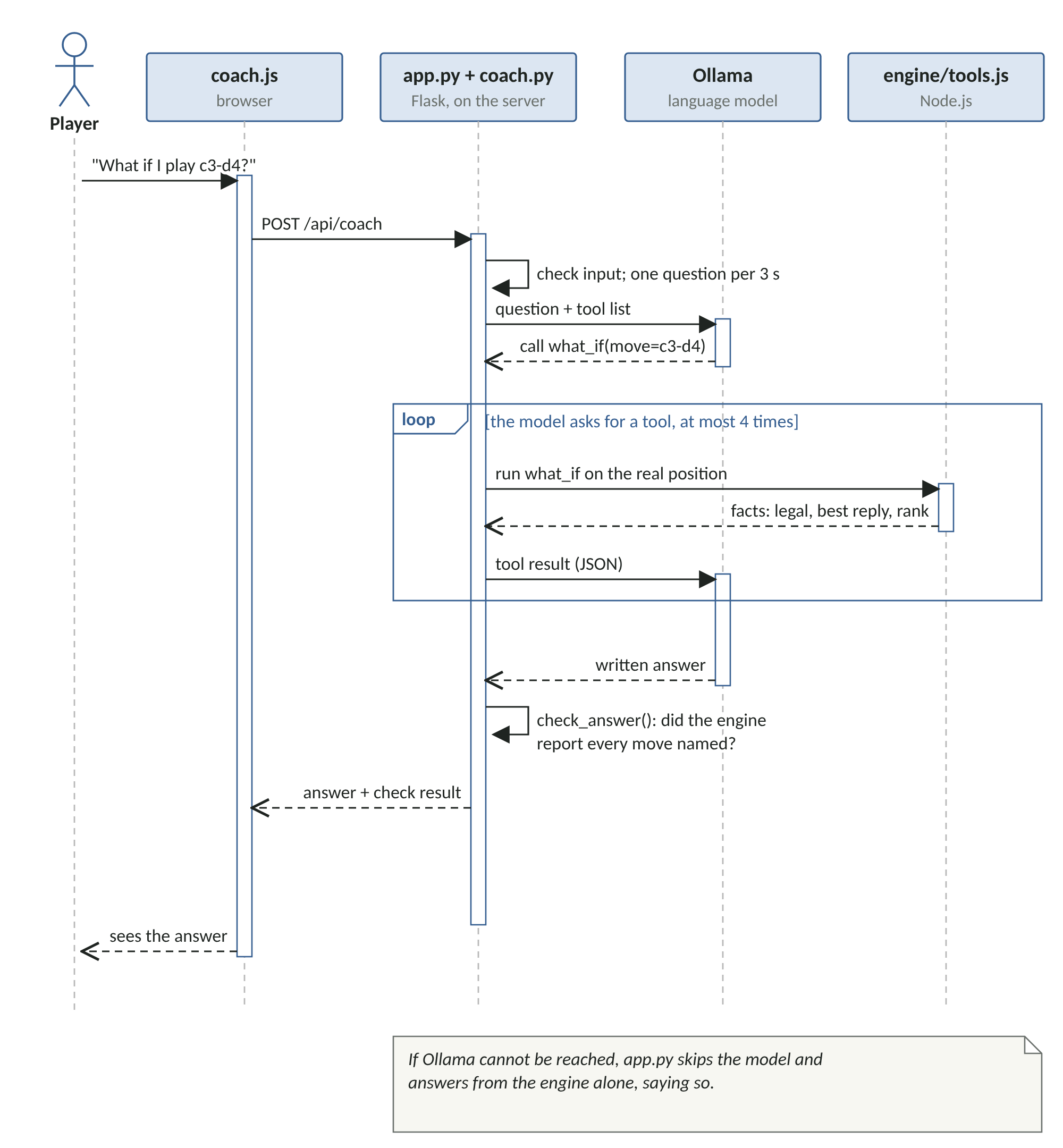
Figure 2: UML sequence diagram of one question to the coach, including the tool-calling loop.
Read the loop frame carefully. The model may ask for a tool, receive the result, and then ask for another. Our code allows at most four rounds, so a confused model cannot keep the server busy for ever. When the model finally replies with text instead of a tool request, the loop ends.
The coach module
Create coach.py next to app.py. These are the parts to look for.
TOOLS describes the three tools. The model chooses tools by reading these descriptions, so they deserve as much care as the code
SYSTEM_PROMPT gives the model its standing instructions: never guess about the game, use the notation, keep answers short, and handle illegal moves helpfully. A prompt is any text we send to a model; the system prompt is the part that stays the same for every question
run_tool starts Node.js with
engine/tools.jsand passes it the request. It uses Python'ssubprocessmodule, with a time limitchat sends the conversation to Ollama using Python's built-in
urllib, so no extra package is neededask is the loop from Figure 2
clean removes reasoning that some models wrap in
<think>tags, so players only see the answercheck_answer is the second line of defence described in Module 1
ask_with_fallback catches the case where Ollama is not running or does not answer in time, and replies from the engine alone, saying so
File: coach.py
"""
coach.py - the AI coach.

A language model answers the player's questions in plain English. It is not
allowed to know anything about the game by itself: whenever it needs a fact it
calls one of three TOOLS, and the tools ask the real game engine (engine/tools.js).
After the model answers, check_answer() compares every move it mentions with
what the tools actually reported, so the player is warned about anything the
engine did not confirm.

The model runs in Ollama, on this server, reached at OLLAMA_URL.
"""

import json
import os
import re
import subprocess
import time
import urllib.error
import urllib.request

BASE_DIR = os.path.dirname(os.path.abspath(__file__))
TOOLS_JS = os.path.join(BASE_DIR, "engine", "tools.js")

# Settings can be changed without editing code, using environment variables.
OLLAMA_URL = os.environ.get("OLLAMA_URL", "http://127.0.0.1:11434")
MODEL = os.environ.get("COACH_MODEL", "qwen3")
TIMEOUT = float(os.environ.get("COACH_TIMEOUT", "90"))   # seconds to wait for the model
NODE = os.environ.get("NODE_BINARY", "node")
MAX_TOOL_ROUNDS = 4    # stop the model calling tools for ever

# ---------- The tools the model may call ----------
# Each description tells the model what the tool is for. The model reads these
# descriptions to decide which tool to call, so they matter as much as the code.
TOOLS = [
    {"type": "function", "function": {
        "name": "analyse_position",
        "description": "Analyse the current position with the game engine. Returns whose turn "
                       "it is, whether a capture is compulsory, every legal move, the three best "
                       "moves with an assessment, and the pieces left.",
        "parameters": {"type": "object", "properties": {}, "required": []}}},
    {"type": "function", "function": {
        "name": "what_if",
        "description": "Ask the game engine what happens if the side to move plays a particular "
                       "move. Returns whether the move is legal, the opponent's best reply, the "
                       "assessment after that reply, and how the move ranks against the others.",
        "parameters": {"type": "object", "required": ["move"], "properties": {
            "move": {"type": "string",
                     "description": "The move, written like c3-d4 or c3xe5"}}}}},
    {"type": "function", "function": {
        "name": "review_last_move",
        "description": "Ask the game engine how good the most recent move was, compared with "
                       "the other moves that were possible at the time.",
        "parameters": {"type": "object", "properties": {}, "required": []}}},
]

SYSTEM_PROMPT = """You are a friendly draughts coach for beginners.
Rules you must follow:
1. You do not know the position. Before you mention any move, score or outcome, call a tool and use only what the tools return.
2. Moves are written like c3-d4 for a step and c3xe5 for a capture. Columns are a to h from left to right and rows 1 to 8 from the bottom. Black starts on rows 1 to 3.
3. Answer in no more than three short sentences of plain British English.
4. If a tool says a move is not legal, say so and suggest one of the legal moves it lists."""

# Moves written in our notation, e.g. c3-d4 or c3xe5xg7
MOVE_PATTERN = re.compile(r"\b[a-h][1-8](?:[-x][a-h][1-8])+\b")


# ---------- Running a tool ----------
def run_tool(name, args, context):
    """Ask the game engine (engine/tools.js) and return its answer as a dictionary."""
    request = {"tool": name, "args": args or {}, **context}
    done = subprocess.run([NODE, TOOLS_JS], input=json.dumps(request),
                          capture_output=True, text=True, timeout=20)
    if done.returncode != 0:
        return {"error": "The engine failed: " + done.stderr.strip()[:200]}
    return json.loads(done.stdout)


# ---------- Talking to the language model ----------
def chat(messages):
    """Send the conversation to Ollama's /api/chat and return the model's message."""
    body = json.dumps({"model": MODEL, "messages": messages, "tools": TOOLS,
                       "stream": False}).encode("utf-8")
    req = urllib.request.Request(OLLAMA_URL + "/api/chat", data=body,
                                 headers={"Content-Type": "application/json"})
    with urllib.request.urlopen(req, timeout=TIMEOUT) as response:
        return json.loads(response.read())["message"]


def clean(text):
    """Some models wrap their private reasoning in <think> tags. Players only see the answer."""
    return re.sub(r"<think>.*?</think>", "", text or "", flags=re.S).strip()


def ask(question, context, chat_fn=chat):
    """
    Run the tool-calling loop:
      1. send the question and the tool list to the model;
      2. if the model asks for tools, run them and send back the results;
      3. repeat until the model gives a written answer.
    """
    started = time.time()
    messages = [{"role": "system", "content": SYSTEM_PROMPT},
                {"role": "user", "content": question}]
    tool_log = []
    answer = ""
    for _ in range(MAX_TOOL_ROUNDS):
        message = chat_fn(messages)
        calls = message.get("tool_calls") or []
        if not calls:
            answer = clean(message.get("content"))
            break
        messages.append(message)
        for call in calls:
            name = call["function"]["name"]
            args = call["function"].get("arguments") or {}
            if isinstance(args, str):          # some models send the arguments as text
                args = json.loads(args or "{}")
            result = run_tool(name, args, context)
            tool_log.append({"tool": name, "args": args, "result": result})
            messages.append({"role": "tool", "tool_name": name, "content": json.dumps(result)})
    return {"answer": answer,
            "tools_used": [t["tool"] for t in tool_log],
            "check": check_answer(answer, tool_log),
            "source": "model",
            "seconds": round(time.time() - started, 1)}


# ---------- Checking the answer against the engine ----------
def check_answer(answer, tool_log):
    """Every move the coach mentions must appear in something a tool returned."""
    mentioned = MOVE_PATTERN.findall(answer)
    confirmed = set(MOVE_PATTERN.findall(json.dumps([t["result"] for t in tool_log])))
    unconfirmed = [m for m in mentioned if m not in confirmed]
    problems = []
    if not answer:
        problems.append("The coach did not give an answer.")
    if not tool_log:
        problems.append("The coach answered without asking the engine.")
    if unconfirmed:
        problems.append("The engine did not report these moves: " + ", ".join(unconfirmed) + ".")
    return {"passed": not problems, "problems": problems, "moves_mentioned": mentioned}


# ---------- When the model is not available ----------
def engine_only_answer(context):
    """A plain answer built from the engine alone, used if the model cannot be reached."""
    facts = run_tool("analyse_position", {}, context)
    if facts.get("game_over"):
        return "The game is over."
    best = facts["best_moves"][0]
    return (f"The coach is not available right now, but the engine says: "
            f"{facts['side_to_move']} to move, and the best move is {best['move']} "
            f"({best['verdict']}).")


def ask_with_fallback(question, context):
    try:
        return ask(question, context)
    except (urllib.error.URLError, TimeoutError, ConnectionError, OSError) as error:
        return {"answer": engine_only_answer(context), "tools_used": ["analyse_position"],
                "check": {"passed": True, "problems": [], "moves_mentioned": []},
                "source": "engine only", "note": str(error)[:120]}
Teacher's note: Settings such as the model name and the Ollama address are read from environment variables, named settings outside the code. That lets you switch models or servers without editing the program. Module 8 shows where to set them on the server.
Check your progress
You can explain what happens if the model asks for a tool that does not exist (the tool replies with an error, which the model receives like any other result), and what happens if Ollama is switched off (the engine answers alone).
Module 5: A Flask Route and the Coach Panel
The new route
Add the code below to app.py, just before the if __name__ == "__main__": line at the bottom, and add import coach, import threading and import time at the top with the other imports. The route checks everything the browser sends before anything reaches the model.
The question must be between 1 and 300 characters
The position must be an 8 by 8 board containing only known pieces, with Black or White to move
The last move, if sent, must look like a move in our notation
Each visitor may ask one question every three seconds. This is called rate limiting, and it stops one person keeping the model busy for everyone
From app.py
# ---------- Course 2: the AI coach ----------
PIECES = set(".bBwW")
MOVE_TEXT = re.compile(r"^[a-h][1-8](?:[-x][a-h][1-8])+$")
COACH_GAP = 3.0                 # seconds each visitor must wait between questions
_last_question = {}
_last_question_lock = threading.Lock()


def valid_position(p):
    """A position must be an 8 x 8 board of known pieces, with 'b' or 'w' to move."""
    try:
        return (p["turn"] in ("b", "w") and len(p["board"]) == 8 and
                all(len(row) == 8 and set(row) <= PIECES for row in p["board"]))
    except (KeyError, TypeError):
        return False


def too_soon(visitor):
    """A simple limit so one visitor cannot keep the language model busy."""
    now = time.time()
    with _last_question_lock:
        if now - _last_question.get(visitor, 0) < COACH_GAP:
            return True
        _last_question[visitor] = now
        return False


@app.post("/api/coach")
def ask_coach():
    data = request.get_json(silent=True) or {}
    question = str(data.get("question", "")).strip()
    position, previous = data.get("position"), data.get("previous")
    last_move = data.get("last_move")

    if not 1 <= len(question) <= 300:
        return jsonify({"error": "Questions must be 1-300 characters."}), 400
    if not valid_position(position) or (previous is not None and not valid_position(previous)):
        return jsonify({"error": "The position is not valid."}), 400
    if last_move is not None and not MOVE_TEXT.match(str(last_move)):
        return jsonify({"error": "The last move is not valid."}), 400
    if too_soon(request.remote_addr):
        return jsonify({"error": "Please wait a few seconds between questions."}), 429

    context = {"position": {"board": position["board"], "turn": position["turn"],
                            "quietPlies": 0}}
    if previous is not None and last_move:
        context["previous"] = {"board": previous["board"], "turn": previous["turn"],
                               "quietPlies": 0}
        context["last_move"] = last_move
    return jsonify(coach.ask_with_fallback(question, context))
If a visitor asks too soon, the route replies with status 429, which means "too many requests".
The coach panel
Add the panel to static/index.html, just above the scoreboard section, and load the two new scripts. notation.js goes straight after rules.js, and coach.js goes last, after main.js.
From static/index.html
    <!-- Course 2: the AI coach. coach.js sends questions to /api/coach. -->
    <section class="coach" aria-label="AI coach">
      <h2>Coach</h2>
      <div class="coach-buttons">
        <button type="button" id="askWhy" class="link-btn">Why that move?</button>
        <button type="button" id="askBest" class="link-btn">What should I play?</button>
      </div>
      <form id="coachForm" class="coach-form">
        <input id="coachQuestion" maxlength="300" placeholder="e.g. What if I play c3-d4?"
               aria-label="Question for the coach">
        <button type="submit" class="link-btn">Ask</button>
      </form>
      <p id="coachAnswer" class="coach-answer muted">Ask a question about the game.</p>
      <p id="coachCheck" class="coach-check small"></p>
    </section>
Create static/js/coach.js. It sends the question with the current position and the position before the last move, then shows the answer and the result of the check. As in Course 1, the answer is placed on the page with textContent, so nothing the model writes can ever run as code in the player's browser.
File: static/js/coach.js
/*
 * coach.js - the coach panel (Course 2).
 *
 * It sends the player's question, the current position, and the position
 * before the last move to the server at /api/coach, then shows the answer
 * together with the result of the server's check against the engine.
 * It reads the game variables kept by main.js: game, previousGame and lastMove.
 */

const coachAnswerEl = document.getElementById('coachAnswer');
const coachCheckEl = document.getElementById('coachCheck');

async function askCoach(question) {
  if (!players) {
    coachAnswerEl.textContent = 'Start a game first.';
    return;
  }
  coachAnswerEl.textContent = 'The coach is thinking...';
  coachCheckEl.textContent = '';
  coachCheckEl.className = 'coach-check small';

  const body = { question, position: game };
  if (previousGame && lastMove) {
    body.previous = previousGame;
    body.last_move = Notation.moveName(lastMove);
  }
  try {
    const response = await fetch('api/coach', {
      method: 'POST',
      headers: { 'Content-Type': 'application/json' },
      body: JSON.stringify(body)
    });
    const data = await response.json();
    if (!response.ok) {
      coachAnswerEl.textContent = data.error || 'The coach could not answer.';
      return;
    }
    coachAnswerEl.textContent = data.answer;   // textContent: never run as HTML
    showCheck(data);
  } catch (e) {
    coachAnswerEl.textContent = 'The coach could not be reached.';
  }
}

// Tell the player whether the answer was confirmed by the engine.
function showCheck(data) {
  if (data.source === 'engine only') {
    coachCheckEl.textContent = 'Answer from the engine only: the language model is unavailable.';
    coachCheckEl.classList.add('warn');
  } else if (data.check.passed) {
    coachCheckEl.textContent = 'Checked against the engine (' + data.tools_used.join(', ') + ').';
    coachCheckEl.classList.add('ok');
  } else {
    coachCheckEl.textContent = 'Warning: ' + data.check.problems.join(' ');
    coachCheckEl.classList.add('warn');
  }
}

document.getElementById('askWhy').addEventListener('click', () => {
  if (!lastMove) {
    coachAnswerEl.textContent = 'No move has been played yet.';
    return;
  }
  askCoach('Why was ' + Notation.moveName(lastMove) + ' played, and was it a good move?');
});

document.getElementById('askBest').addEventListener('click', () => {
  askCoach('What should I play now, and why?');
});

document.getElementById('coachForm').addEventListener('submit', (event) => {
  event.preventDefault();
  const question = document.getElementById('coachQuestion').value.trim();
  if (question) askCoach(question);
});
Small changes to main.js
The coach needs to know the position before the last move, so main.js now keeps it in a variable called previousGame. Add let previousGame = null; with the other variables at the top, set it back to null in startGame, and save it at the start of playMove.
From static/js/main.js
function playMove(move) {
  previousGame = game;
  game = Rules.applyMove(game, move);
  lastMove = move;
  selected = null;
  render();
  nextTurn();
Players also need to see the square names to ask about moves. In render, add these two lines just before the line const p = board[r][c];, and add the small label helper at the bottom of the file next to setStatus.
From static/js/main.js
      // Course 2: label the edge squares so players can name moves like c3-d4.
      if (c === 0) sq.appendChild(label('rank', 8 - r));
      if (r === 7) sq.appendChild(label('file', 'abcdefgh'[c]));
From static/js/main.js
function label(kind, text) {
  const span = document.createElement('span');
  span.className = 'coord ' + kind;
  span.textContent = text;
  return span;
Finally, add the styles for the labels and the panel at the end of style.css.
From static/css/style.css
/* ---------- Course 2: board coordinates and the coach panel ---------- */
.coord {
  position: absolute;
  font-size: clamp(8px, 2.2vw, 12px);
  color: rgba(0, 0, 0, 0.45);
  pointer-events: none;
}
.sq.dark .coord { color: rgba(255, 255, 255, 0.7); }
.coord.rank { top: 2px; left: 3px; }
.coord.file { bottom: 1px; right: 3px; }

.coach {
  background: var(--panel);
  border: 1px solid var(--line);
  border-radius: 8px;
  padding: 12px 14px;
}
.coach h2 { font-size: 1rem; margin: 0 0 8px; }
.coach-buttons { display: flex; gap: 8px; flex-wrap: wrap; margin-bottom: 8px; }
.coach-form { display: flex; gap: 8px; }
.coach-form input {
  flex: 1;
  min-width: 0;
  padding: 8px;
  font-size: 16px;
  border: 1px solid var(--line);
  border-radius: 6px;
}
.coach-answer { margin: 10px 0 4px; line-height: 1.4; }
.coach-check.ok { color: var(--accent); }
.coach-check.warn { color: #9a3b2f; }
Run it
You need three terminals in VS Code this time. Use the plus button in the terminal panel to open more, and activate the virtual environment in each one that runs Python.
In the first, start the stand-in:
python devtools/fake_ollama.pyIn the second, tell the coach to use it, then start the game. On macOS or Linux type
OLLAMA_URL=http://127.0.0.1:11435 python app.py; on Windows, where the VS Code terminal runs PowerShell, type$env:OLLAMA_URL = "http://127.0.0.1:11435"and thenpython app.pyOpen
http://127.0.0.1:5000, start a game, play a move and press "Why that move?"
When the stand-in works, stop the game, start it again without the OLLAMA_URL setting, and the coach will use your real model in Ollama instead. On Windows, first type Remove-Item Env:OLLAMA_URL, or open a new terminal, because the setting stays in that terminal until you remove it.
Check your progress
The coach panel answers, and the line under the answer says "Checked against the engine". Ask "What if I play c3-c4?" at the start of a game, and the answer should explain that the move is not legal.
Module 6: Evaluation: How Often the Coach Contradicts the Engine
Why measure
Trying a few questions by hand tells you very little. Language models vary from answer to answer, and a coach that is right nine times in ten will look perfect in a short demonstration. Evaluation means asking a fixed set of questions with known correct answers, scoring every answer automatically, and recording the result. It is how you choose between models, test a change to the prompt, or notice when something gets worse.
The test cases
eval/make_cases.js builds 30 test questions from 10 real game positions: for each, "What should I play now?", "Why did my opponent play ...?" and "What happens if I play ...?". A fixed random seed means the same 30 cases are produced every time, so results are comparable between runs.
File: eval/make_cases.js
/*
 * eval/make_cases.js - build a fixed set of test questions for the coach.
 *
 * Each case is a real game position, reached by playing a seeded sequence of
 * moves, plus a question a player might ask. Because the seed is fixed, the
 * same cases are produced every time, so results can be compared fairly
 * between models, prompts or versions of the code.
 *
 * Run:  node eval/make_cases.js > eval/cases.json
 */

const Rules = require('../static/js/rules.js');
const Notation = require('../static/js/notation.js');

// A tiny random number generator with a seed, so the cases never change.
function seeded(seed) {
  return () => {
    seed = (seed * 1103515245 + 12345) % 2147483648;
    return seed / 2147483648;
  };
}

const rand = seeded(2026);
const cases = [];
let id = 1;

for (let g = 0; g < 10; g++) {
  let state = Rules.newGame();
  let previous = null, lastMove = null;
  const plies = 6 + Math.floor(rand() * 20);
  for (let i = 0; i < plies && !Rules.result(state); i++) {
    const moves = Rules.legalMoves(state);
    const move = moves[Math.floor(rand() * moves.length)];
    previous = state;
    lastMove = Notation.moveName(move);
    state = Rules.applyMove(state, move);
  }
  if (Rules.result(state)) continue;
  const legal = Rules.legalMoves(state).map(Notation.moveName);
  const base = { position: state, previous, last_move: lastMove };
  cases.push({ id: id++, kind: 'best_move', question: 'What should I play now?', ...base });
  cases.push({ id: id++, kind: 'why', question: 'Why did my opponent play ' + lastMove + '?', ...base });
  cases.push({ id: id++, kind: 'what_if',
               question: 'What happens if I play ' + legal[Math.floor(rand() * legal.length)] + '?', ...base });
}

process.stdout.write(JSON.stringify(cases, null, 1));
Scoring the answers
eval/run_eval.py asks the coach every question and records three measures.
| Measure | Passes when |
|---|---|
| used_engine | The coach called at least one tool before answering |
| no_invention | Every move the coach mentioned was reported by the engine |
| agrees | For "What should I play?", the coach named one of the engine's best moves |
File: eval/run_eval.py
"""
eval/run_eval.py - measure how well the coach does on a fixed set of questions.

For every case in eval/cases.json it asks the coach the question, then scores
the answer with three checks:
  used_engine   - the coach called at least one tool before answering
  no_invention  - every move it mentioned was reported by the engine
  agrees        - for "what should I play?", it named the engine's best move

Run with the model you want to measure already running in Ollama:
    python eval/run_eval.py
The results are printed and saved to eval/report.json, so you can compare
different models, prompts or settings over time.
"""

import json
import os
import sys
import time

sys.path.insert(0, os.path.dirname(os.path.dirname(os.path.abspath(__file__))))
import coach  # noqa: E402

HERE = os.path.dirname(os.path.abspath(__file__))


def context_for(case):
    ctx = {"position": case["position"]}
    if case.get("previous"):
        ctx["previous"] = case["previous"]
        ctx["last_move"] = case["last_move"]
    return ctx


def score_case(case):
    ctx = context_for(case)
    started = time.time()
    try:
        reply = coach.ask(case["question"], ctx)
    except Exception as error:                     # record failures instead of stopping
        return {"id": case["id"], "kind": case["kind"], "error": str(error)[:120],
                "used_engine": False, "no_invention": False, "agrees": None, "seconds": None}
    result = {
        "id": case["id"], "kind": case["kind"], "answer": reply["answer"],
        "used_engine": bool(reply["tools_used"]),
        "no_invention": not any("did not report" in p for p in reply["check"]["problems"]),
        "agrees": None,
        "seconds": round(time.time() - started, 1),
    }
    if case["kind"] == "best_move":
        best = coach.run_tool("analyse_position", {}, ctx)["best_moves"]
        top_score = best[0]["men"]
        equally_good = {b["move"] for b in best if b["men"] == top_score}
        result["agrees"] = any(m in equally_good for m in reply["check"]["moves_mentioned"])
    return result


def percent(rows, key):
    values = [r[key] for r in rows if r[key] is not None]
    return round(100 * sum(values) / len(values)) if values else None


def main():
    cases = json.load(open(os.path.join(HERE, "cases.json")))
    rows = [score_case(c) for c in cases]
    times = sorted(r["seconds"] for r in rows if r["seconds"] is not None)
    summary = {
        "model": coach.MODEL, "cases": len(rows),
        "used_engine_%": percent(rows, "used_engine"),
        "no_invention_%": percent(rows, "no_invention"),
        "agrees_with_engine_%": percent(rows, "agrees"),
        "median_seconds": times[len(times) // 2] if times else None,
        "slowest_seconds": times[-1] if times else None,
    }
    json.dump({"summary": summary, "cases": rows}, open(os.path.join(HERE, "report.json"), "w"),
              indent=1)
    for key, value in summary.items():
        print(f"{key:>22}: {value}")
    failed = [r for r in rows if not (r["used_engine"] and r["no_invention"])]
    for r in failed:
        print(f"  case {r['id']} ({r['kind']}): {r.get('answer') or r.get('error')}")


if __name__ == "__main__":
    main()
Type the commands below to build the cases and run the evaluation against whichever model the coach is set to use.
node eval/make_cases.js > eval/cases.json
python eval/run_eval.py
On Windows, PowerShell's > can save the file in an encoding that Python cannot read, so build the cases with the command below instead of the first command above, then run the evaluation as above.
node eval/make_cases.js | Out-File -Encoding ascii eval/cases.jsonTesting the test
How do you know the checker would catch a coach that invents moves? You make one. The stand-in can be told to replace a move in its answer with an invented one a set share of the time.
File: devtools/fake_ollama.py
"""
devtools/fake_ollama.py - a STAND-IN for Ollama, for testing only.

This is not a language model. It answers Ollama's /api/chat requests by
following fixed rules, so that every other part of the coach - the tool loop,
the engine tools, the answer checker and the evaluation - can be built and
tested before a real model is installed.

  * If no tool has been called yet, it calls one, chosen from the question.
  * Once it has a tool result, it writes a short answer from that result.
  * MISTAKE_RATE (0 to 1) makes it sometimes name a move the engine never
    reported, imitating a model that invents things. The checker should catch
    every one of these.

Run it with:   python devtools/fake_ollama.py
and point the coach at it with:   OLLAMA_URL=http://127.0.0.1:11435
"""

import json
import os
import random
import re
import sys

from flask import Flask, jsonify, request

MOVE = re.compile(r"\b[a-h][1-8](?:[-x][a-h][1-8])+\b")
MISTAKE_RATE = float(os.environ.get("FAKE_MISTAKE_RATE", "0"))

app = Flask(__name__)


def choose_tool(question):
    q = question.lower()
    if "why" in q or "last" in q:
        return "review_last_move", {}
    found = MOVE.search(q)
    if found:
        return "what_if", {"move": found.group(0)}
    return "analyse_position", {}


def invent_move(rng):
    """A move-shaped string the engine never mentioned (it may not even be legal)."""
    files = "abcdefgh"
    c, r = rng.randrange(8), rng.randrange(1, 8)
    return f"{files[c]}{r}-{files[(c + 1) % 8]}{r + 1}"


def write_answer(tool, result, rng):
    if "error" in result:
        return "Sorry, the engine could not answer that."
    if tool == "analyse_position":
        if result.get("game_over"):
            return "The game is over."
        best = result["best_moves"][0]
        move = best["move"]
        text = f"{result['side_to_move']} to move. The engine's choice is {move}, and the position is {best['verdict']}."
    elif tool == "what_if":
        if not result["legal"]:
            return f"{result['move']} is not legal here. You could play {result['legal_moves'][0]} instead."
        move = result["move"]
        if "game_over" in result:
            return f"After {move} the game ends: {result['game_over']}."
        text = (f"After {move}, the best reply is {result['best_reply']} and you would be "
                f"{result['after_best_reply']['verdict']}. The engine prefers {result['engine_best_move']}.")
    else:
        if "note" in result:
            return result["note"]
        move = result["move"]
        text = (f"{result['played_by']} played {move}, ranked {result['rank']} of {result['out_of']}. "
                f"The engine's choice was {result['engine_best_move']}.")
    if rng.random() < MISTAKE_RATE:
        text = text.replace(move, invent_move(rng), 1)
    return text


@app.post("/api/chat")
def chat():
    body = request.get_json()
    messages = body["messages"]
    question = next(m["content"] for m in reversed(messages) if m["role"] == "user")
    rng = random.Random(json.dumps(messages[-1]))   # same input, same behaviour
    tool_messages = [m for m in messages if m["role"] == "tool"]
    if not tool_messages:
        name, args = choose_tool(question)
        message = {"role": "assistant", "content": "",
                   "tool_calls": [{"function": {"name": name, "arguments": args}}]}
    else:
        last = tool_messages[-1]
        message = {"role": "assistant",
                   "content": write_answer(last["tool_name"], json.loads(last["content"]), rng)}
    return jsonify({"model": "fake", "message": message, "done": True})


if __name__ == "__main__":
    port = int(sys.argv[1]) if len(sys.argv) > 1 else 11435
    app.run(host="127.0.0.1", port=port)
We ran the evaluation twice while writing this course: once with an honest stand-in, and once with a careless one set to invent a move 20 per cent of the time. Figure 3 shows the results.
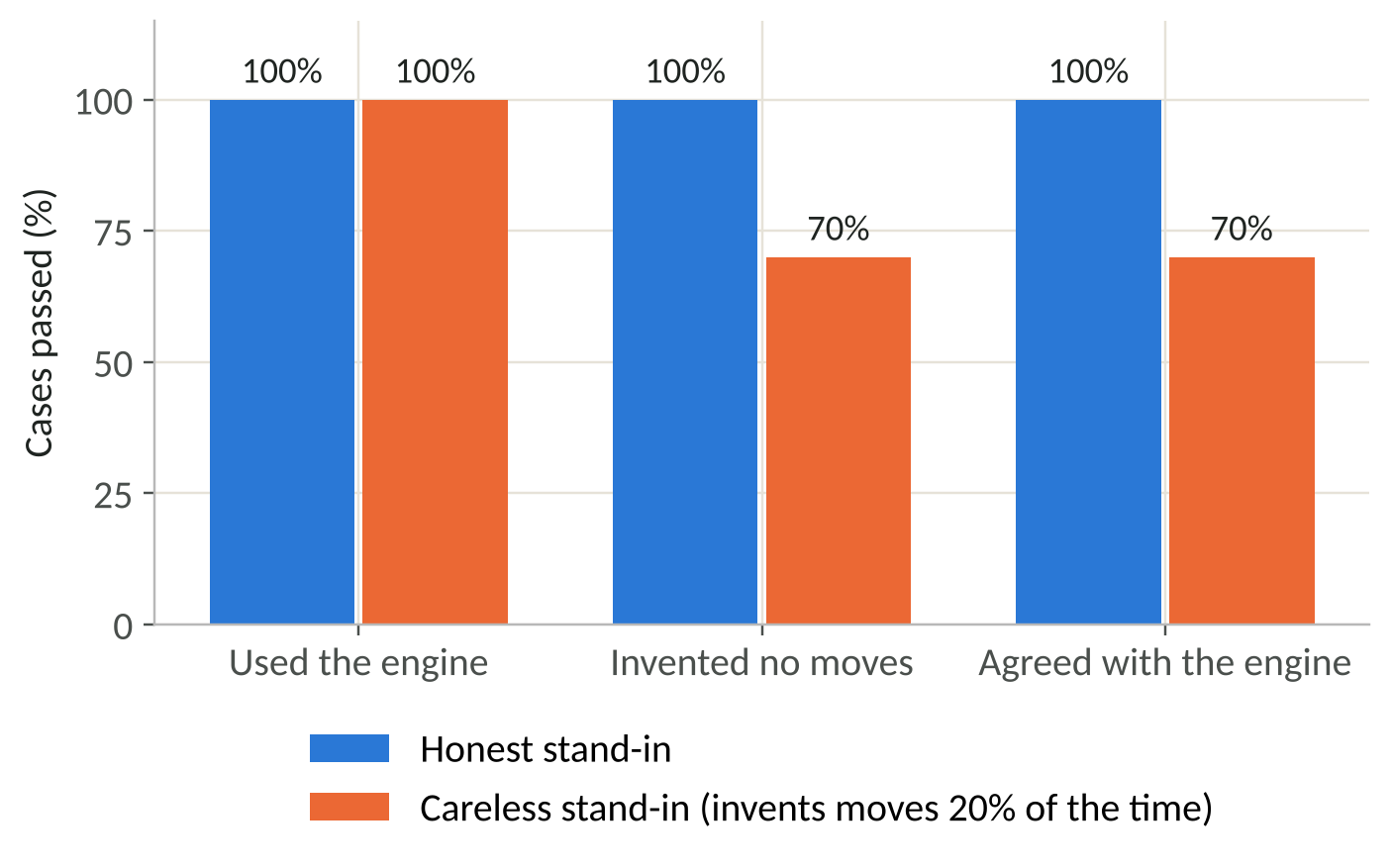
Figure 3: Evaluation results for the honest and careless stand-ins, 30 cases each.
The honest stand-in passed every case. The careless one passed 21 of 30 for both "invented no moves" and "agreed with the engine": in 9 cases it named a move the engine never reported, and the checker caught all 9. That is more than the 20 per cent we asked for, which is normal with only 30 cases: chance alone moves the count by several either way.
Measuring your real model
Now run the same evaluation against your real model, and record the results in a table like the one below. Run it twice: the first run includes the time Ollama takes to load the model.
| Model | Used engine | Invented no moves | Agrees | Median seconds | Slowest seconds |
|---|---|---|---|---|---|
| qwen3 (your result) |
Teacher's note: Be honest about what the checker does not catch. It checks moves, not words. A coach that says "you are winning" when the engine said "clearly worse" will pass. Improving the checker to compare these assessment words with the engine's is one of the exercises in Module 9.
Check your progress
You have an evaluation result for your own model, saved in eval/report.json, and you can explain what each of the three measures does and does not tell you.
Module 7: Testing
As in Course 1, automatic tests check the parts of the coach that do not need a language model. The tool tests check the notation and each tool against positions with known answers.
File: tests/test_tools.js
// Run with:  node tests/test_tools.js
// Checks the move notation and the engine tools the coach relies on.
const test = require('node:test');
const assert = require('node:assert');
const Rules = require('../static/js/rules.js');
const Notation = require('../static/js/notation.js');
const { runTool } = require('../engine/tools.js');

test('square names match the board', () => {
  assert.strictEqual(Notation.squareName([7, 0]), 'a1');   // bottom left
  assert.strictEqual(Notation.squareName([0, 7]), 'h8');   // top right
  assert.deepStrictEqual(Notation.parseSquare('c3'), [5, 2]);
  assert.strictEqual(Notation.parseSquare('i9'), null);
});

test('every opening move has a name that finds the same move again', () => {
  const moves = Rules.legalMoves(Rules.newGame());
  for (const m of moves) assert.strictEqual(Notation.findMove(moves, Notation.moveName(m)), m);
});

test('captures are written with x', () => {
  const rows = ['........', '........', '...w....', '........', '.w......', 'b.......', '........', '........'];
  const state = { board: rows.map(r => r.split('')), turn: 'b', quietPlies: 0 };
  assert.deepStrictEqual(Rules.legalMoves(state).map(Notation.moveName), ['a3xc5xe7']);
});

test('analyse_position lists legal moves and the best three', () => {
  const out = runTool({ tool: 'analyse_position', position: Rules.newGame() });
  assert.strictEqual(out.side_to_move, 'Black');
  assert.strictEqual(out.legal_moves.length, 7);
  assert.strictEqual(out.best_moves.length, 3);
  for (const b of out.best_moves) assert.ok(out.legal_moves.includes(b.move));
});

test('what_if rejects an illegal move and lists the legal ones', () => {
  const out = runTool({ tool: 'what_if', args: { move: 'c3-c4' }, position: Rules.newGame() });
  assert.strictEqual(out.legal, false);
  assert.ok(out.legal_moves.includes('c3-d4'));
});

test('what_if gives a reply and a rank for a legal move', () => {
  const out = runTool({ tool: 'what_if', args: { move: 'c3-d4' }, position: Rules.newGame() });
  assert.strictEqual(out.legal, true);
  assert.ok(out.rank >= 1 && out.rank <= out.out_of);
  assert.match(out.best_reply, /^[a-h][1-8][-x][a-h][1-8]/);
});

test('review_last_move ranks the move that was played', () => {
  const previous = Rules.newGame();
  const move = Rules.legalMoves(previous)[0];
  const out = runTool({ tool: 'review_last_move', previous,
                        position: Rules.applyMove(previous, move),
                        last_move: Notation.moveName(move) });
  assert.strictEqual(out.played_by, 'Black');
  assert.ok(out.rank >= 1);
});
The coach tests use a scripted model: a short function that returns fixed replies, so we can test the tool loop, the checker and the fallback without Ollama running at all.
File: tests/test_coach.py
"""Run with:  python tests/test_coach.py   (Node.js must be installed)"""
import os
import sys

sys.path.insert(0, os.path.dirname(os.path.dirname(os.path.abspath(__file__))))
import coach  # noqa: E402

START = {"board": [list(r) for r in [".w.w.w.w", "w.w.w.w.", ".w.w.w.w", "........",
                                     "........", "b.b.b.b.", ".b.b.b.b", "b.b.b.b."]],
         "turn": "b", "quietPlies": 0}
CONTEXT = {"position": START}


def scripted_model(replies):
    """A pretend model that gives a fixed list of replies, one per call."""
    replies = list(replies)
    return lambda messages: replies.pop(0)


def test_tool_loop_runs_the_engine():
    model = scripted_model([
        {"role": "assistant", "content": "",
         "tool_calls": [{"function": {"name": "what_if", "arguments": {"move": "c3-d4"}}}]},
        {"role": "assistant", "content": "c3-d4 is legal and the game stays level."},
    ])
    reply = coach.ask("What if I play c3-d4?", CONTEXT, chat_fn=model)
    assert reply["tools_used"] == ["what_if"]
    assert reply["check"]["passed"], reply["check"]


def test_invented_move_is_caught():
    model = scripted_model([
        {"role": "assistant", "content": "",
         "tool_calls": [{"function": {"name": "analyse_position", "arguments": {}}}]},
        {"role": "assistant", "content": "Play h4-g5, it wins at once."},
    ])
    reply = coach.ask("What should I play?", CONTEXT, chat_fn=model)
    assert not reply["check"]["passed"]
    assert "h4-g5" in reply["check"]["problems"][0]


def test_answer_without_engine_is_flagged():
    model = scripted_model([{"role": "assistant", "content": "Just attack!"}])
    reply = coach.ask("What should I play?", CONTEXT, chat_fn=model)
    assert "without asking the engine" in reply["check"]["problems"][0]


def test_reasoning_tags_are_removed():
    assert coach.clean("<think>private</think> Play c3-d4.") == "Play c3-d4."


def test_engine_answer_when_model_is_missing():
    coach.OLLAMA_URL = "http://127.0.0.1:9"      # nothing listens here
    reply = coach.ask_with_fallback("What should I play?", CONTEXT)
    assert reply["source"] == "engine only"
    assert "best move is" in reply["answer"]


def test_coach_route_checks_input():
    import app as server
    client = server.app.test_client()
    assert client.post("/api/coach", json={"question": "", "position": START}).status_code == 400
    bad = {"board": [["x"] * 8] * 8, "turn": "b"}
    assert client.post("/api/coach", json={"question": "Hi", "position": bad}).status_code == 400
    ok = client.post("/api/coach", json={"question": "What should I play?", "position": START})
    assert ok.status_code == 200
    again = client.post("/api/coach", json={"question": "And now?", "position": START})
    assert again.status_code == 429                # too soon after the last question


if __name__ == "__main__":
    for name, fn in list(globals().items()):
        if name.startswith("test_"):
            fn()
            print("passed", name)
Run all the tests with the commands below. The Course 1 tests are still there and should still pass.
node tests/test_rules.js
node tests/test_tools.js
python tests/test_app.py
python tests/test_coach.py
Check your progress
All four test files pass: 8 and 7 passing tests in the two JavaScript files, and every line in the Python files starts with passed.
Module 8: Deploying Ollama on the Server
This module adds the coach to your live game. It builds on Module 11 of Course 1, so keep that open too.
Part A: Install Node.js and Ollama
The server needs Node.js to run the engine tools.
sudo apt install nodejs
node --version
Then install Ollama by following its Linux instructions (see the appendix). They include running Ollama as a systemd service, so it starts automatically with the server. When it is installed, download the same model you tested on your computer.
ollama pull qwen3Part B: Keep the model private
Ollama's documentation states that it listens on 127.0.0.1, port 11434, by default, which means only programs on the server itself can reach it. Keep it that way. Check it with the command below: the address shown should start with 127.0.0.1. Never open port 11434 in the firewall.
sudo ss -ltnp | grep 11434Part C: Copy the new files
From your project folder on your own computer, copy the changed and new files to the server.
scp -r app.py coach.py draughts.wsgi engine static you@your-server:/var/www/draughts/Part D: Settings for the coach
Apache does not pass its own environment variables on to Python, so the coach's settings live in draughts.wsgi. Check them on the server, especially the model name.
File: draughts.wsgi
"""
draughts.wsgi - the entry point Apache's mod_wsgi uses to start the app.

mod_wsgi looks for a variable called `application` in this file.
Course 2: the coach's settings are set here, because Apache does not pass its
own environment variables on to Python. Change them to suit your server.
"""
import os
import sys

os.environ.setdefault("OLLAMA_URL", "http://127.0.0.1:11434")   # where Ollama listens
os.environ.setdefault("COACH_MODEL", "qwen3")                    # the model you pulled
os.environ.setdefault("COACH_TIMEOUT", "90")                     # seconds
os.environ.setdefault("NODE_BINARY", "/usr/bin/node")            # runs engine/tools.js

# Make sure Python can find app.py, which sits next to this file.
sys.path.insert(0, os.path.dirname(os.path.abspath(__file__)))

from app import app as application  # noqa: E402
Apache must wait long enough for the model to answer. Find the Timeout setting in /etc/apache2/apache2.conf and make sure it is longer than COACH_TIMEOUT. Then reload Apache.
grep -n "^Timeout" /etc/apache2/apache2.conf
sudo systemctl reload apache2
Part E: Measure what the model needs
Now take the measurements the follow-on plan asked for. Ask the coach a few questions in the browser, then check how much memory the server is using, and run the evaluation on the server to record accuracy and response times there.
free -h
cd /var/www/draughts
venv/bin/python eval/run_eval.py
If memory is close to full, or the slowest answer is longer than players will wait, try a smaller model and measure again. Record your results in the table from Module 6.
Teacher's note: We tested Parts C and D on Ubuntu 24.04 with Apache2 and mod_wsgi, using the stand-in in place of Ollama. The coach answered through Apache, running the engine with Node.js as the www-data user. Parts A, B and E depend on your model and server, so they are for you to complete and record.
Troubleshooting
| What you see | Likely cause | What to do |
|---|---|---|
| "The coach is not available right now" | Ollama is not running or not reachable | Run systemctl status ollama and check OLLAMA_URL in draughts.wsgi |
| "The engine failed" in an answer | Node.js is missing or not at /usr/bin/node | Run which node and set NODE_BINARY to match |
| Answers take a very long time, then fail | Model too large for the server, or Apache Timeout too short | Measure with Part E; try a smaller model |
| "Please wait a few seconds between questions" | The rate limit is working | Wait three seconds |
Module 9: Where to Go Next
Check the words, not just the moves. Extend
check_answerso that if the engine said "clearly worse", an answer containing "winning" is flaggedMeasure prompt changes. Change one sentence of the system prompt, run the evaluation again, and keep the change only if the numbers improve
Stream the answer. Ollama can send an answer word by word as it is written. Showing it as it arrives makes a slow model feel faster
Compare models. Run the evaluation on two or three tool-capable models and choose using accuracy, speed and memory together
Known limitations
The checker is narrow. It only checks that mentioned moves came from the engine, as explained in Module 6
Speed depends on your server. The coach can only be as fast as the model on your hardware, and the first question after a pause is slower while the model loads
The rate limit is per server process. It is held in memory, so it resets when Apache restarts, and it is shared by visitors behind the same network address
Glossary of Terms
| Term | Meaning |
|---|---|
| Environment variable | A named setting kept outside the program, such as OLLAMA_URL, so it can change without editing code |
| Evaluation | Measuring an AI system's accuracy on a fixed set of test cases with known answers |
| Fallback | What a system does when part of it fails. Here, the engine answers alone if the model is unavailable |
| Grounding | Giving a language model verified facts to work from, so it describes those facts rather than inventing its own |
| Hallucination | A confident answer from a language model that is not true |
| JSON Schema | A standard way to describe the shape of JSON data, used here to describe each tool's arguments |
| Language model | Software trained on large amounts of text to predict and generate text |
| Notation | A way of writing down squares and moves, such as c3-d4 |
| Ollama | Open-source software for downloading and running language models on your own computer or server |
| Open-weight model | A language model whose trained parameters can be downloaded and run locally, under the terms of its own licence |
| PowerShell | The command-line shell that the VS Code terminal uses on Windows |
| Prompt | The text and data sent to a language model. The system prompt is the part that stays the same for every question |
| Rate limiting | Allowing each visitor only a certain number of requests in a period of time |
| Role | In a chat with a model, who a message is from: system, user, assistant or tool |
| Stand-in | A simple program that copies another program's interface, used for testing |
| Standard input and output | The channels a command-line program reads from and writes to, used here to pass JSON to Node.js |
| Subprocess | A separate program started and controlled by another program |
| systemd service | A program that Ubuntu starts automatically and keeps running in the background |
| Tool calling | A language model asking the surrounding program to run a function and using the result in its answer |
Appendix: Sources
| Topic | Source |
|---|---|
| Course 1 | Building an AI Draughts Game for the Web, OUTPUTS/Draughts AI Course/ |
| Tool calling in Ollama, message format | Ollama documentation, Tool calling: https://docs.ollama.com/capabilities/tool-calling |
| Ollama default address and keep-alive time | Ollama FAQ: https://raw.githubusercontent.com/ollama/ollama/main/docs/faq.mdx |
| Running Ollama on Linux | Ollama documentation, Linux: https://cdn.jsdelivr.net/gh/ollama/ollama@0.9.0/docs/linux.md |
| Downloading Ollama | https://ollama.com |
| Running other programs from Python | Python documentation, subprocess: https://docs.python.org/3/library/subprocess.html |
| Web requests from Python | Python documentation, urllib.request: https://docs.python.org/3/library/urllib.request.html |
| Virtual environments cannot be copied | Python documentation, venv: https://docs.python.org/3/library/venv.html |
| AirPlay Receiver using port 5000 on a Mac | Apple Developer Forums, Why is Control Center on Monterey listening on ports?: https://developer.apple.com/forums/thread/682332 |
| Environment variables in PowerShell | Microsoft Learn, about_Environment_Variables: https://learn.microsoft.com/powershell/module/microsoft.powershell.core/about/about_environment_variables |
| File encoding of > in Windows PowerShell | Microsoft Learn, about_Character_Encoding: https://learn.microsoft.com/powershell/module/microsoft.powershell.core/about/about_character_encoding |